2026-07-06
Klassy
I've never been too happy with the default window decorations in KDE. The buttons are fairly small, and it can be hard to snap your mouse cursor into the upper right hand corner of the screen to close the window. You have to be much more accurate with your mouse clicks. And coming from Windows, I'm very used to being able to just bump my mouse into the upper right hand corner of the screen and close whatever window is there. Sure, you can make the title bar bigger and the buttons bigger, but I could never get it quite right. Using a different theme didn't really help much, and introduced a new issue which caused my mouse pointer to freeze for a moment every time a window was moved or resized. So I began looking into alternatives.
I found Klassy (https://github.com/paulmcauley/klassy) a while back and have been using it for some time now. Klassy is a highly customizeable window decoration plugin for KDE which allows you to specify just about everything for your window decorations. And since it's a KDE plugin, it's fast and doesn't cause the aforementioned mouse freezing issue.
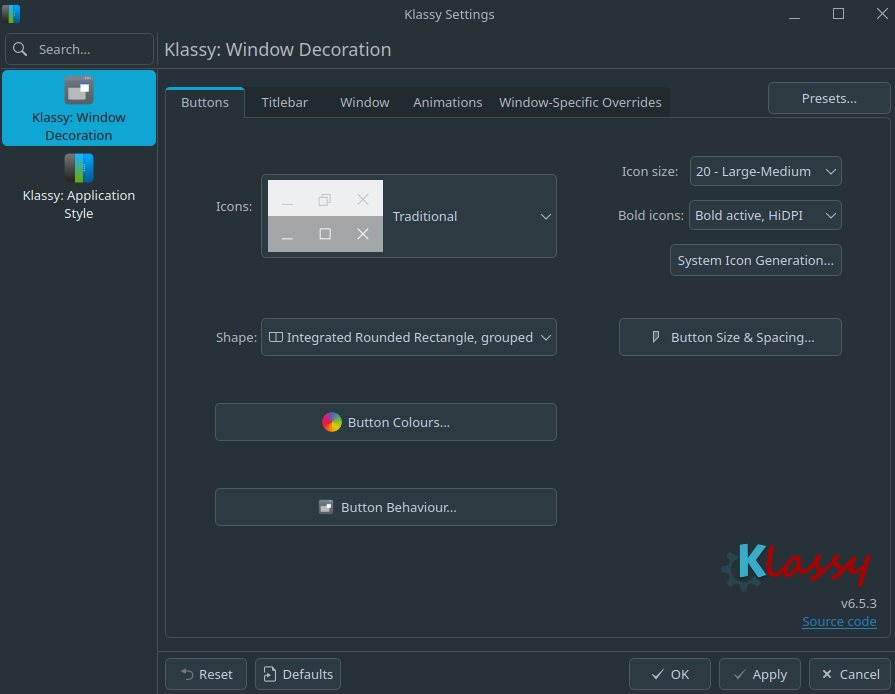
You can specify the colors of the buttons, their size, their hover color and behavior, and other aspects of the title bar of your windows. It's highly flexible!
I'm using Fedora 44 and to install it, I simply followed the instructions for installing via repo (to ensure it stays updated along with my other system packages) and then installed it with dnf. You can then specify Klassy as your Window Decoration in themes, then use the Klassy Settings application to configure it.